縮時 Timelapse
回覆

舉例: 我要在 /proc/mydevice 底下, cat model
#define CONFIG_SETBOOTARGS "setenv bootargs ${bootargs} ${mtdparts};"\ "setenv bootargs ${bootargs} phy_mode=${phy_mode} coherent_pool=1M uuid=${uuid} model=${model};"
2. 進入機器的uboot, 輸入printenv, 會看到如下:
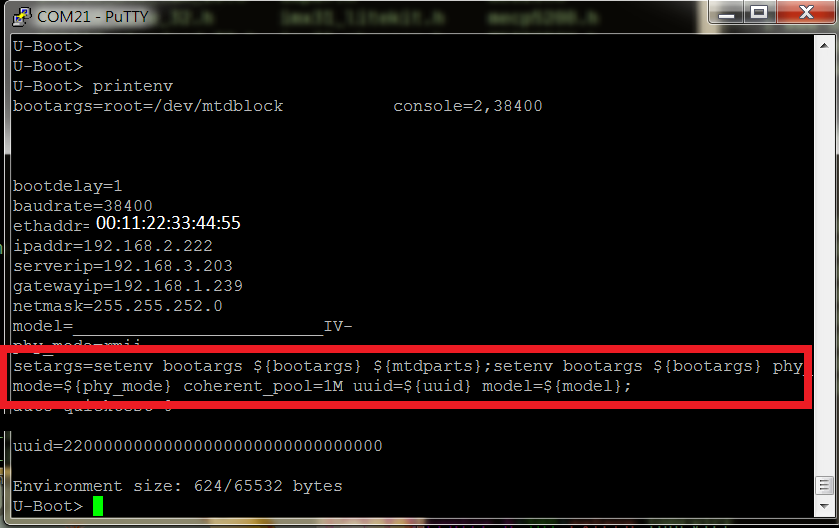
3. 去kernel的code, 找到有關static init __init XXXX的檔案, 比如我的是 init/main.c, 加入以下code:
char struuid[32+1]={0};
static int __init myuuid(char *str)
{
    struuid[ sizeof( struuid )-1 ] = 0x00;
    strncpy( struuid, str, sizeof( struuid )-1 );
    return 1;
}

char strmodel[32+1]={0};
static int __init mymodel(char *str)
{
    char         * pStr;
    strmodel[ sizeof( strmodel )-1 ] = 0x00;

    for ( pStr = str; *pStr == '_'; pStr++ );
    strncpy( strmodel, pStr, sizeof( strmodel ) -1 );

    return 1;
}

__setup("model=", mymodel);
__setup("uuid=", myuuid);
4. 去Kernel的code, 大約路徑在 /fs/proc底下, 新增一支檔案, 內容如下, 然後重新燒入, 就大功成啦.
/***********************************************************************
 *                                                                     *
 ***********************************************************************/
#include <linux/fs.h>
#include <linux/init.h>
#include <linux/proc_fs.h>
#include <linux/seq_file.h>
#include <linux/kernel.h>
#include <linux/mtd/mtd.h>
#include <linux/err.h>
/***********************************************************************
 *                                                                     *
 **********************************************************************/
struct proc_dir_entry * mydir = NULL;
extern char strmodel[];
/***********************************************************************
 *                                                                     *
 ***********************************************************************/
static int model_proc_show(struct seq_file *m, void *v)
{
  seq_printf(m, "%s\n", strmodel);
  return 0;
}
/***********************************************************************
 *                                                                     *
 ***********************************************************************/
static int model_proc_open(struct inode *inode, struct file *file)
{
  return single_open(file, model_proc_show, NULL);
}
/***********************************************************************
 *                                                                     *
 ***********************************************************************/
static const struct file_operations model_proc_fops = {
  .open   = model_proc_open,
  .read   = seq_read,
  .llseek   = seq_lseek,
  .release  = single_release,
};
/***********************************************************************
 *                                                                     *
 ***********************************************************************/
static int __init proc_model_init(void)
{
  if ( mydir == NULL )
  {
    mydir = proc_mkdir("mydevice", NULL);
  }

  proc_create("model", S_IRUGO, mydir, &model_proc_fops);
  return 0;
}

/***********************************************************************
 *                                                                     *
 ***********************************************************************/
module_init(proc_model_init);
/***********************************************************************
 *                                                                     *
 ***********************************************************************/
:1,$s/word1/word2/gc
:%s/word1/word2/gc
從第一行到最後一行尋找 word1 字串,並將該字串取代為 word2 !且在取代前顯示提示字元給使用者確認(conform)是否需要取代!

:set nu
顯示行號,設定之後,會在每一行的字首顯示該行的行號

u       復原前一個動作
v	開始字串標記
V	開始行標記
d	刪除標記的內容
p       為複製的資料在游標下一行貼上
pp      為貼在游標上一行

dd      刪除一整列
ndd     刪除游標所在的向下 n 列,例如 20dd 則是刪除 20 列
y	複製標記的內容
yy	複製游標行
nyy     複製游標所在的向下 n 列,例如 20yy 則是複製 20 列
gg	移到第一行
GG	移到最後一行
yG	複製游標行到最後一行
y1G	複製游標行到第一行
y$	複製游標處到最後一個字元
y0	複製游標處到第一個字元
p	在下一行貼上複製或刪除的內容
P	在上一行貼上複製或刪除的內容
將8080 http的封包dump出來, 然後再用wireshark開啟看
tcpdump port 8080 -w – | tee /home/tina/a.pcap | tcpdump -r –
tcpdump -i eno1 port 1883 -w – | tee /root/a.pcap | tcpdump -r –
tcpdump port 8080 -X
查行程:
ps aux | grep 8080
查看系統資源的command
htop 可以看行程名稱有沒有開太多的thread,沒有妥善關閉
top –p pid 看行程的CPU MEM占用%數
ps aux | grep xxxx 看記憶體
pmap –x pid 看占用的記憶體分布如何
看程式執行時, 哪個function佔最多cpu比率
ps aux | grep tunnel <—-找出 PID
sudo perf top -p PID
看firewall表:
iptables -nvL | grep udp
這個指令才是把當前路徑中所有目錄所佔用大小做統計並且排序
du -chd 1 | sort -h
du -c xx目錄 ->看某一個目錄大小
diff 檔案
diff -y -W 100
要看mount 上去的狀態
mount
cat /proc/mounts
cat /etc/mtab
df -h
ls /dev/disk/by-uuid
/etc/fstab —> 這可以看, 開機時, 掛了哪些設備
掛載並給予權限
mount -o umask=0007 -o uid=www-data -o gid=www-data /dev/sda1 /mnt/data/test
如果 SD 卡有問題, 卡插進linux時, dmesg會看到, usb有變動
在linux底下: fsck /dev/sdb , 看是什麼檔案格式, 如果是fat32, 建議在windows做比較好
fat32 : windows底下 formate fat32
not fat32 : mkfs.vfat
1. Upload
cd /to/your/path
# git add .
# way a: git commit -m 'your description'
# way b: git commit
# git push

2. Clone
# git clone git@192.168.0.200:/home/xxx/git/dsif.git

3. add tag
git tag -a v0.0.01 -m "v0.0.01"
git push origin --tags

4. add new repository
cd /mnt/data/git/
su gitrm -rf bg77.git
mkdir bg77.git
cd /mnt/data/git/bg77.git
git init --bare --shared
vi description

/* if add new repository, must add in list */
cd /home/git
vi projects.list

5. checkout by tag
git checkout <tag_name>
* 把所有副檔名為 .sh 的權限, 改為775
find . -type f -name *.sh -exec chmod 775 {} \;
* 把所有目錄的權限, 改為664
find . -type d -exec chmod 664 {} \;
* 找所有檔案屬性是execut
find . -type f -exec file {} \; | grep execut
* 找檔名為xxx.c的檔案
find . -name xxx.c
* 找權限0777的檔案
find . -type f -perm 0777